Royal Movers Online Booking – Ticket Prices, App, Contact Number & Complete Guide
Booking bus tickets in Pakistan has become much more convenient with the rise of digital platforms and modern transport services. One of the easiest ways to plan your journey today is through Royal Movers Online Booking system, which allows passengers to reserve seats without visiting the terminal. From my personal experience, I (Arslan) used to rely on physical booking offices, but switching to online booking saved me a lot of time and effort. Now, checking bus timings, comparing ticket prices, and confirming seats can all be done within a few minutes from home.
In this guide, I will explain all the available methods for booking tickets online, including helpline support, terminal visits, and trusted platforms like Bookkaru. Many passengers still feel confused about how the online system works or which method is best, so I’ve tried to make everything simple and clear. Based on my experience, once you understand the process, booking tickets online with Royal Movers becomes the easiest part of your travel planning. This guide will help you choose the right method and avoid common mistakes while booking your bus tickets.
Royal Movers Online Booking
Royal Movers online ticket booking system is a simple and time-saving option for passengers across Pakistan. You can easily check routes, timings, and ticket prices before confirming your seat from home. If you need help with booking or have any questions, you can use the contact numbers given in the table below.

| Royal Movers Online Booking Numbers | ||
| UAN: | 0310-00-00-595 | |
| Mobile: | 0323-02-01-100 | |
| WhatsApp: | 0323-02-01-100 | |
How to Book Tickets Online?
For passengers’ convenience, Royal Movers offers multiple online ticket reservation options. Whether you prefer calling a helpline, visiting your nearest terminal, or using an online portal, you can choose the method that suits you best. From my experience, having different booking options makes the process more flexible and convenient. You can choose one of the following options:

Book Tickets via Helpline & WhatsApp
If you prefer a quick and simple method, booking your ticket through the helpline or WhatsApp is a great option. You can directly contact the support team, share your route, date, and seat preference, and they will guide you through the booking process. From my personal experience, I found WhatsApp booking very convenient, especially when I needed a quick response without going through multiple steps. This method is ideal for passengers who want instant assistance or are not comfortable using online platforms.
Find the Royal Movers helpline and WhatsApp numbers below:
Visit Your Nearest Booking Terminal
If you prefer a traditional ticket booking method, visiting your nearest bus station is always a reliable option. You can directly talk to the staff, check seat availability, and confirm your ticket on the spot. This method is especially helpful for passengers who want face-to-face guidance or have specific travel queries.
From my personal experience, I have found terminal booking useful when traveling during busy days or when I need last-minute tickets. It also gives you peace of mind, as everything is confirmed in front of you without any confusion. However, it may take extra time compared to Royal Movers online booking methods.
Mobile App Booking (via Bookkaru)
Passengers can easily book business class tickets using the Bookkaru mobile application, the official online booking partner of Royal Movers. This app provides a smooth and user-friendly experience where you can check routes, bus timings, and ticket rates in just a few taps. From my personal experience, I found the app very helpful, especially when booking tickets on the go without needing a laptop.
The Bookkaru app is available for both Android and iPhone users, making it accessible for every passenger. You can quickly create an account, check schedules, select your route, and reserve your desired seat within minutes. It’s a great option for passengers who prefer mobile booking instead of calling or visiting terminals. Download the latest Bookkaru mobile apps below:
Royal Movers Online Booking via Bookkaru (Website & App)
Bookkaru is currently one of the most reliable platforms for booking bus tickets online in Pakistan. It allows passengers to check routes, compare ticket prices, and reserve seats without any hassle. I found this booking portal very smooth and fast, especially when booking tickets for long routes.
You can use the Bookkaru.com website or mobile application to reserve your seats online; the booking process is the same. Follow these steps to reserve your seats online:
All done. Now, on your travel date, go to the bus terminal, show your e-ticket at the counter, and get a boarding pass.
Video Guide: How to Use the Bookkaru App for Ticket Booking
If you are new to online booking, watching a step-by-step video can make the process even easier to understand. In this video, you will learn how to use the Bookkaru mobile application to search routes, select seats, check bus schedules, and complete your ticket booking within minutes.
Video Credit: Stylitic Explorer
Popular Routes for Online Booking
Passengers across Pakistan are now using Royal Movers online booking facility for many popular travel routes. Whether you are traveling for work, family visits, or tourism, these routes are commonly booked through online mobile applications. I have noticed that routes between major cities are always in high demand, especially on weekends and holidays. Booking online for the following routes helps secure your seat in advance:
Online Ticket Booking Payment Methods
When booking your bus ticket online, passengers can choose from multiple secure and easy payment options. These methods are designed to make the booking process smooth, whether you are paying through your mobile wallet, bank card, or online banking. From my personal experience, I (Arslan) found digital payments very convenient because they save time and confirm your ticket instantly.
You can use any of the following payment options to buy a ticket on the checkout page:
Paying via Credit or Debit Card
Using a credit or debit card is one of the most secure and fastest ways to complete your online ticket booking. You can simply enter your card details on the payment page and confirm the transaction within seconds. This method is widely accepted on booking platforms like Bookkaru, Bookme, and Sastaticket, making it a convenient option for most users.
Personally, I found card payments very smooth, especially when booking tickets during urgent travel plans or on Eid holidays, when there is a lot of rush at the bus terminals. The payment is processed instantly, and the e-ticket is generated immediately. It also removes the need to visit banks or physical payment points.
Please make sure your card is activated for online transactions before making the payment to avoid any issues or delays.
JazzCash Wallet Payment Option
JazzCash is one of the most popular mobile wallet services in Pakistan, and it makes online ticket payments quick and easy. You can simply select JazzCash at checkout and complete the payment using your mobile wallet number. Once the transaction is confirmed, the e-ticket is instantly generated.
I found JazzCash very useful when I didn’t have access to a bank card. The payment process is simple, and you don’t need to visit any physical location. It’s especially helpful for users who prefer mobile-based transactions. However, make sure your JazzCash account has enough balance before starting the booking process.
Bookkaru Wallet Payment Method
Bookkaru Wallet is also a convenient digital payment option that allows passengers to complete ticket booking without using a bank card or cash. You can load funds into your Bookkaru Wallet and use the balance directly while booking your seats online. This makes the process faster and more efficient, especially for frequent travelers like you.
To use this method, simply top up your Bookkaru Wallet through available options like bank transfer or mobile wallets. After that, select the wallet option at checkout and confirm your booking in just a few seconds. Please make sure your Bookkaru wallet has sufficient balance before starting the booking.
Bank Transfer Payment Option (Alfalah)
Bank transfer is the most reliable method for passengers who prefer direct payments from their bank account while booking tickets online. It allows you to securely send the payment through online banking or mobile banking apps like Meezan Bank, HBL, Alfalah, and National Bank, without needing a debit or credit card. Once the payment is completed, your booking is usually confirmed shortly after verification.
The bank transfer is useful when booking larger trips or family travel where multiple tickets are involved. It feels secure because the transaction goes directly through your bank, and you also get a proper payment record. However, it may take a few minutes longer compared to instant wallet payments.
To use this method, simply select bank transfer at the checkout page and follow the instructions provided by the booking platform. Make sure to enter the correct reference number so your payment can be verified quickly and your e-ticket is issued without any delay.
If you have a Bank Alfalah account, use it to get huge discounts and coupons.
EasyPaisa Payment Method
EasyPaisa is another widely used mobile wallet in Pakistan that makes online ticket payments simple and accessible for everyone. You can choose EasyPaisa at checkout and complete the payment directly through your mobile account. Once the transaction is successful, the ticket is confirmed instantly.
To use EasyPaisa, just ensure your account has enough balance before starting the booking process. After selecting the EasyPaisa option, follow the instructions and confirm the payment to receive your e-ticket immediately.
PayFast Online Payment Gateway
You can also use Payfast as a payment method on Bookkaru to reserve your seats online. It makes the transactions secure, smooth, and user-friendly. It is especially useful when other direct options like wallet payments are not available.
To use PayFast, simply select it as your payment method at checkout and choose your preferred option, such as debit/credit card or mobile wallet. After completing the transaction, you will receive a confirmation message, and your e-ticket will be issued immediately.
Which Online Booking Method Works Best?
When it comes to booking Royal Movers bus tickets online, every method has its own advantages depending on the passenger’s needs. Some people prefer mobile wallets for quick payments, while others feel more comfortable using bank cards or visiting booking platforms like Bookkaru. The good thing is that all these options are designed to make the booking process simple and accessible for everyone.
I personally feel that using the Bookkaru platform is the most balanced and best option because it combines ease of use, multiple payment methods, and instant confirmation. However, for urgent bookings, you may consider calling the helpline number 0310-00-00-595 as the 2nd best option.
Overall, the best method really depends on your situation and travel needs. If you want speed, go for mobile wallets. If you want flexibility and control, Bookkaru is a great choice. And if you prefer traditional banking security, then a bank transfer works best.
Why You Should Book Bus Tickets Online?
Online bus ticket booking facility has made travel much easier and more convenient for passengers across Pakistan. Instead of visiting terminals and waiting in long queues, you can now reserve your seat in just a few minutes from your mobile or laptop. Personally, I find online booking especially useful during busy travel seasons when seats get sold out quickly.
Benefits of Online Ticket Booking:
Common Online Booking Problems & Their Solutions
While online booking is simple, some passengers may still face small issues during the process. These problems are usually easy to fix if you know what to do. Personally, during the busy travel days like weekends and Eid holidays. I have also faced a few of the following situations:
- Payment Failed, but Amount Deducted
Sometimes the payment doesn’t go through, but the amount is deducted. In such cases, the amount is usually refunded automatically within a few hours or days. If not, you can contact customer support for help. - Did Not Receive E-Ticket
If your ticket is not received after payment, check your SMS or email again. You can also log in to the booking platform to download your ticket or contact support. - Wrong Date or Route Selected
This is a common mistake during quick booking. Always double-check your details before payment. If booked incorrectly, you may need to cancel or modify your ticket as per Bookkaru’s policy. - Seat Not Confirmed
In rare cases, the seat may not be confirmed due to a system delay. It’s best to contact the helpline immediately to verify your booking status. - Website or App Not Working
During peak hours, booking portals may slow down. In such situations, you can try again after some time or use an alternative method like WhatsApp or helpline booking.
How Refunds and Cancellations Work?
If a passenger is unable to travel after booking a ticket online, most booking platforms provide a refund or cancellation options depending on their policy. The process is usually simple and can be done through the same platform where the ticket was purchased, such as Bookkaru, the official booking system of Royal Movers. Refund eligibility may depend on how early the cancellation is made before the bus departure time.
As per my experience, the early cancellations usually have a better chance of receiving a partial or full refund, while last-minute cancellations may include a deduction. It’s always recommended to check the refund policy before confirming your booking to avoid any confusion later. Keeping your booking details safe also helps in processing refunds quickly.
In case of any issue, passengers can also contact customer support through the helpline or WhatsApp for assistance. The support team usually guides you through the refund process and helps resolve queries related to payment or ticket cancellation.
Smart Tips for Hassle-Free Ticket Booking
A smooth booking experience depends on a few simple but important practices that many passengers often overlook. Following these tips can help you avoid delays, payment issues, or seat unavailability during your travel planning. From my personal experience, I always keep these points in mind to make sure everything goes smoothly.
Book Early for Better Seats
Try to reserve your seat in advance, especially during weekends, holidays, and peak travel seasons, to avoid last-minute unavailability.
Verify All Travel Details
Always double-check your name, date, route, and seat selection before making the payment to avoid mistakes.
Use Trusted Booking Platforms Only
Stick to reliable booking platforms like Bookkaru or the official helpline for secure transactions and confirmed tickets.
Keep Your E-Ticket Safe
Save a screenshot or download your e-ticket after booking so you can easily access it during travel.
Ensure Sufficient Balance
Make sure your mobile wallet or bank account has enough funds before starting the payment process.
Contact Support if Needed
If you face any issues, don’t hesitate to contact the helpline or WhatsApp support for quick help.
Avoid Last-Minute Booking
Booking at the last moment can lead to limited seat options and higher stress during travel.
Save Important Contacts
Keep helpline numbers saved on your phone for quick access in case of emergencies.
Infographic – 6 Steps to Book Your Seat Online
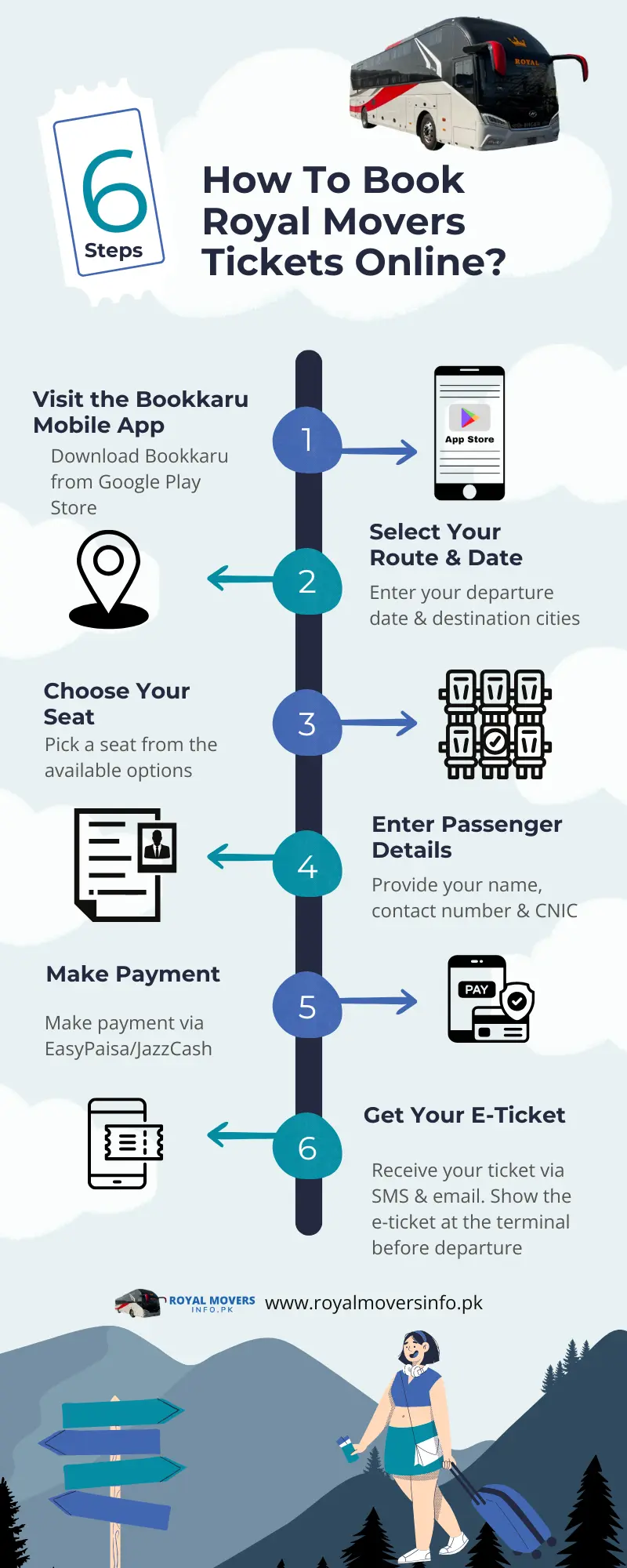
Infographic – 6 steps to book your seats online